watchOS 27.2 could introduce a feature that lets Apple Watch screenshots be previewed with options to share or delete, similar to how screenshots work on the iPhone.
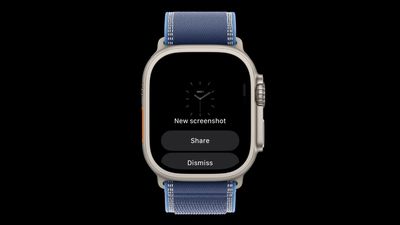
Signs of the feature were found in watchOS 27.2 by code explorer pdfu. The option is hidden behind a feature flag that’s not enabled, but it could be introduced in a later watchOS 27.2 beta.
A new screenshot experience is coming to Apple Watch, inspired by iPhone.
Hidden behind a feature flag in watchOS 27.2, it lets you preview, share, or delete a screenshot right after taking it. pic.twitter.com/MT5wmDjRnq
— pdfu (@itspdfu) September 24, 2026
Right now, taking a screenshot on the Apple Watch sends it directly to the iPhone Photos app with no confirmation screen. It’s easy to accidentally take a screenshot since it only requires pressing the Digital Crown and side button at the same time.
On the iPhone, taking a screenshot shows either a full-screen preview or a thumbnail preview depending on your settings, but both options let you save, share, or delete the screenshot with a couple taps.
Screenshots on Apple Watch are disabled by default but can be turned on through the Settings app on the watch or the Apple Watch app on iPhone. An option to save or delete screenshots would add more control than a simple on or off toggle.
Popular Stories
PSA: watchOS 27 Removes This Useful Feature From Your Apple Watch
Apple released watchOS 27 on September 14, bringing a new Audio Intelligence feature set to its latest Apple Watch models, but as a result, owners of previous models are set to lose out doubly in the process. Apple Watch Series 12 and Ultra 4 models later this year will get Live Rewind, a feature that provides a transcript of any spoken audio that was picked up by the device in the last 15…
Apple Releases watchOS 27 With Siri AI, New Watch Face, Smart Stack Improvements and More
Apple today released watchOS 27, the newest version of the operating system that runs on the Apple Watch. watchOS 27 is compatible with the Apple Watch Series 9 and later, the Apple Watch Ultra 2 and later, and the Apple Watch SE 3. watchOS 27 can be downloaded for free on a compatible device through the Settings app on the watch. The update introduces support for Siri AI, a more capable…
Upgrading to Apple Watch Series 12 Could Cost You Hypertension Notifications
Some Apple Watch users who upgrade to the Series 12 or the Ultra 4 might temporarily lose access to hypertension notifications. On the watchOS feature availability page, Apple says notifications might not be available on the Series 12 or Ultra 4 at launch because regulatory clearances are in process. Hypertension Notifications may not be available on Apple Watch Series 12 or Ultra 4 in your …