In macOS 27 Golden Gate, Apple has removed many of the menu item icons that are so prevalent throughout macOS 26 Tahoe, as spotted by Nikita “Tonsky” Prokopov (via Daring Fireball). The developer shared before-and-after screenshots on Mastodon to evidence the reversal.
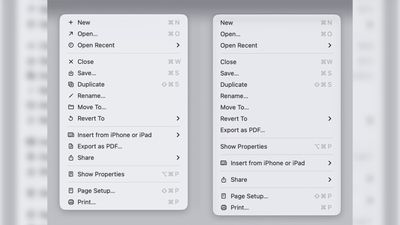
Menu item icons in macOS 26 (left) vs. macOS 27 (image: Nikita Prokopov)
Tahoe was the first version of macOS to place a small icon next to nearly every entry in the menu bar across Apple’s apps, but the change drew swift criticism from designers and developers. Many of the icons are inconsistent and often difficult to understand on their own, with different Apple apps showing different icons for the same menu items.
The third-party developer pushback was strong enough that some even adopted open-source code provided by NetNewsWire’s Brent Simmons to switch the icons off by default.
In Golden Gate though, they’re gone – or only used where genuinely useful. Apple has also revised its Human Interface Guidelines to tell developers to use menu item icons “sparingly and with purpose,” reserving them for common actions, file system locations, connected devices, and similar cases.
macOS 27 is currently in developer beta, with a public beta to arrive next month, followed by a general release in the fall.
Popular Stories
Apple Releases macOS Tahoe 26.5.1 to Fix Shutdown Issue Affecting Enterprise Users on M5 Macs
Apple today released macOS Tahoe 26.5.1, a small update to the macOS Tahoe operating system that came out last year. macOS Tahoe 26.5.1 comes three weeks after Apple released macOS Tahoe 26.5. Mac owners can download the software by opening the System Settings app and then navigating to the Software Updates section. According to Apple’s release notes for the update, macOS Tahoe 26.5.1…
First macOS Tahoe 26.6 Beta Now Available for Developers
Apple today provided the first beta of an upcoming macOS Tahoe 26.6 update to developers for testing purposes, with the update coming two weeks after Apple launched macOS Tahoe 26.5. Developers can download the macOS Tahoe 26.6 update by opening up the System Settings app, selecting the General category, and then choosing Software Update. Beta Updates will need to be enabled, and a free…
Apple Alerted to macOS Security Vulnerability Uncovered With AI Tool
Anthropic recently announced Project Glasswing, an initiative that enables tech companies like Apple to use its new frontier AI model Claude Mythos Preview to find security vulnerabilities across operating systems and web browsers. The Wall Street Journal today reported that researchers at cybersecurity firm Calif used Claude Mythos Preview to uncover a new macOS security vulnerability last…