iOS 18 and tvOS 18 reintroduce SharePlay for Apple Music on the HomePod, HomePod mini, and Apple TV. The feature first appeared in the iOS 17.4 and tvOS 17.4 betas earlier this year, but it was removed before those updates were released.
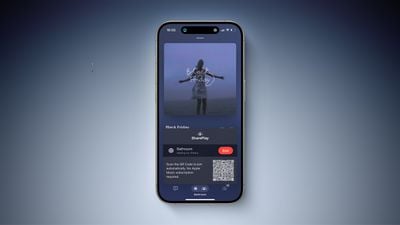
This feature allows others to control Apple Music playback on your HomePod or Apple TV with permission, regardless of whether they subscribe to the service. The primary user can decide whether to approve or deny each request.
Apple already rolled out a similar feature for CarPlay last year, allowing anyone in a car to control music playback via SharePlay with permission.
HomePod
While playing a song in the Music app on your iPhone, tap the SharePlay icon at the bottom of the screen to bring up a QR code, which another person can scan with their iPhone or Android smartphone’s camera to request access to music playback controls. Even a screenshot of the QR code suffices for remote access.
The feature works on both the HomePod and HomePod mini, and we could imagine the QR code eventually being shown on the long-rumored HomePod with a screen.
Apple TV
With the tvOS 18 update, the Music app on the Apple TV can also show a QR code on the TV that guests can scan to request access to music controls.
The expansion of this feature to the Apple TV and the HomePod is useful for house parties, allowing everyone to be the DJ.
iOS 18, tvOS 18, and HomePod software version 18 are currently in beta, and the updates will be widely released later this year.
Popular Stories
iOS 18 Adds These 5 New Features to CarPlay
Apple did not mention CarPlay during its WWDC keynote this week, but iOS 18 includes a handful of new features for the in-car software. Overall, there is not a whole lot new for CarPlay on iOS 18, with changes seemingly limited to the Messages and Settings apps so far. Below, we recap everything new for CarPlay on iOS 18. New for CarPlay on iOS 18 1. Contact Photos in Messages App…
iOS 18 Adds Pop-Out Bezel Animation When Pressing iPhone Buttons
iOS 18 includes a small but interesting change for the buttons on the iPhone, adding more of a visual element when changing volume, activating the Action button, or locking the screen. When you press an iPhone button in iOS 18, the display bezel bulges outward slightly. This feature is available for the volume buttons, Action button and the power button, and it will also likely be used for…
Revealed: iOS 18 Works With These iPhone Models
iOS 18 will be compatible with the same iPhone models as iOS 17, according to a post on X today from a private account with a proven track record of sharing build numbers for upcoming iOS updates. iOS 18 will be compatible with the iPhone XR, and hence also the iPhone XS and iPhone XS Max models with the same A12 Bionic chip, but older iPhone models will miss out. Here is the full…
First Look at Messages via Satellite in iOS 18
Apple has been gradually expanding its suite of satellite connectivity features for iPhone, and iOS 18 brings a significant new one in the form of Messages via satellite. The feature allows users to send and receive iMessages and SMS texts, including emoji and Tapbacks, while out of range of cellular and Wi-Fi networks. CNET met up with Apple’s senior director of platform product marketing,…
Massive iPhone Upgrade Coming This Week But These Devices Will Miss Out
Apple is planning a major AI overhaul in iOS 18, with a feature set it is referring to as “Apple Intelligence.” However, these new features will not work on older iPhones, even if they do appear on the new operating system’s device compatibility list. Apple’s initial AI roadmap for iOS 18 is said to come in two parts: Basic AI features that will be processed on-device, and more advanced…
Your iPhone 15 Can Show the Time When It’s Out of Battery in iOS 18
The iPhone has had a Power Reserve function that holds back a small amount of battery life to allow features like Find My and NFC unlocking to work even when your device has died, and in iOS 18, Apple seems to be improving the feature further for the iPhone 15 models. As demonstrated on Reddit, when the battery on an iPhone running iOS 18 is exhausted, the phone can continue to show the time …