Apple’s MacBook Air has undergone major changes in recent years, with several significant generational improvements – making it all the more important to consider if now is a good time to upgrade or even if an older model will suffice for your needs.
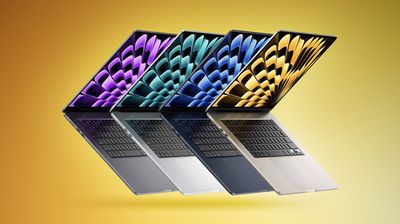
In 2022, Apple introduced a substantial refresh for the MacBook Air featuring a complete redesign and the M2 chip. One year later, it added a variant of the same machine with a larger, 15-inch display. Both the 2018 and 2020 Intel-based MacBook Air models have been discontinued. Apple still sells a MacBook Air with this design, the 2020 model with the M1 chip starting at $999 – the cheapest MacBook Air available from the company today, and even lower prices may be found with third-party retailers or second-hand. In terms of the latest models, the 13-inch M2 MacBook Air starts at $1,099, while the 15-inch M2 model starts at $1,299.
See the breakdown below for each new feature, change, and improvement that was added with each MacBook Air model since 2018 compared to its direct predecessor:
MacBook Air (M2, 2022/2023)
- Thinner design with flat lid, rounded bottom edges, and uniform thickness
- 13.6- or 15.3-inch Liquid Retina display
- Apple M2 chip
- Up to 10-core GPU
- Hardware-accelerated H.264, HEVC, ProRes and ProRes RAW
- ProRes encode and decode engine
- Up to 24GB unified memory
- 100GB/s memory bandwidth
- 500 nits brightness
- 1080p FaceTime HD camera
- Four-speaker sound system or six-speaker sound system with force-cancelling woofers
- 3.5mm headphone jack with support for high-impedance headphones
- Bluetooth 5.3
- MagSafe 3
- Fast-charge capable with available 70W USB‑C Power Adapter
- Available in Silver, Space Gray, Starlight, and Midnight
- 1.24 kg (2.7 pounds) or 1.51 kg (3.3 pounds)
MacBook Air (M1, 2020)
- Apple M1 chip
- 8-core CPU
- Up to 8-core GPU
- Media engine
- Hardware-accelerated H.264 and HEVC
- Video decode engine
- Video encode engine
- 16-core Neural Engine
- Up to 16GB unified memory
- 62.5GB/s memory bandwidth
- Wide colour (P3)
- Image signal processor with computational video
- Up to 18-hour battery life
MacBook Air (Intel, 2020)
- Up to Intel Core i7 processor
- Intel Iris Plus Graphics GPU
- Up to 2TB storage
- Magic Keyboard
- Bluetooth 5.0
- 1.29 kg (2.8 pounds)
MacBook Air (Intel, 2018)
- Tapered “wedge” design
- 13.3-inch Retina display
- Up to Intel Core i5 processor
- Up to 4-core CPU
- Intel UHD Graphics 617
- Up to 16GB memory
- Up to 1.5TB storage
- Butterfly Keyboard
- 400 nits brightness
- Full standard colour (sRGB)
- 720p FaceTime HD camera
- Stereo speakers
- 3.5mm headphone jack
- 802.11ac Wi‑Fi 6
- Bluetooth 4.2
- Up to 12-hour battery life
- Available in Silver, Space Gray, and Gold
- 1.25 kg (2.75 pounds)
While the M1 MacBook Air is ostensibly good value for money at $999 and can be found even cheaper with education pricing and elsewhere via third-party retailers, it is notable that the M2 13-inch MacBook Air is now just $1,099. 2018 or 2020 Intel MacBook Air users will still benefit from upgrading to the M1 MacBook Air, but given that it is only $100 cheaper than the M2 model – they are much better off upgrading to the latest model. $100 is a comparatively small price to pay for a much newer machine with a more modern design, the M2 chip, a larger and brighter display, faster memory, a 1080p camera, better speakers, MagSafe 3, fast-charging, and more.
Most M1 MacBook Air users will still stand to benefit from upgrading to the M2 model, especially if they are looking for a bigger screen and opt for the 15-inch model, but some will be better off waiting for the next major refresh. Apple is already rumored to be working on new MacBook Air models featuring the M3 chip for release in 2024, sporting substantial performance and efficiency improvements.
Popular Stories
Gmail, Google Docs and Google Sheets Gain Support for 2018 iPad Pro Models
Google today updated its Gmail, Google Docs, and Google Sheets apps for iOS devices, introducing support for the new 11 and 12.9-inch iPad Pro models. The update brings an optimized form factor that no longer features distracting black bars at the top and bottom of the display in portrait mode or at the sides in landscape mode. Following the update, the Gmail app takes up the entirety of the…
Here Are All the Macs Compatible With macOS Monterey
macOS Monterey is compatible with many of the Macs that were able to run macOS Big Sur, but it drops support for some older MacBook Air and iMac models from 2013 and 2014. A full compatibility list is below: iMac – Late 2015 and later iMac Pro – 2017 and later MacBook Air – Early 2015 and later MacBook Pro – Early 2015 and later Mac Pro – Late 2013 and later Mac mini -…