Google Photos is getting a new wardrobe planning feature that will help you decide what to wear. AI will pull in images of clothing from the Google Photos library, organizing clothing items into a digital closet. You will be able to put items together to create outfits, and even virtually try them with a digital avatar on to see how they’ll look.
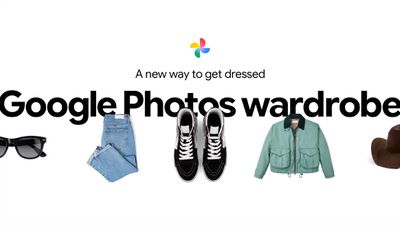
The Google Photos app will show all items of clothing in a new Wardrobe section in the Collections tab. Clothing can also be viewed in specific categories like tops or bottoms. Items of clothing can be mixed and matched to create outfits, and the results can be shared with friends or saved to a digital moodboard.
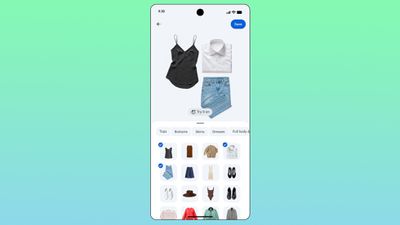
In the popular 1995 comedy Clueless, main character Cher Horowitz has an iconic digital wardrobe that Google seems to be making a reality with Google Photos. Cher uses a touchscreen computer to swipe through the clothes in her wardrobe, pairing different tops and bottoms to create an outfit. A built-in “Dress Me” button tells her if two items go together, and if they do, she can preview the clothes on a digital version of herself.
Google’s version of the Clueless virtual wardrobe will be coming to Google Photos this summer. Google says it will be available to Android users first, and then iOS users.
Popular Stories
Don’t Like Your Gmail Email Address? You Can Finally Change It
Google today announced that you can finally change the Google Account email address that you use for Gmail, Google Calendar, Google Photos, Google Drive, and more, but this ability is only rolling out to U.S. accounts for now. The company did not indicate if or when this functionality will be available in other countries. You can switch to any available @gmail.com address, and your previous…
Google Brings Vertical Tabs and Improved Reading Mode to Chrome
Google today updated its Chrome browser with support for vertical tabs, which are displayed in a sidebar instead of at the top of the browser. The tab layout can be changed by right clicking on any Chrome window and choosing the “Show Tabs Vertically” option. Sidebar tabs feature full page titles and make it simple to organize tab groups. Google has also added a new full-page interface…
Gemini in Google Chrome Gets a Skills Library for Saving Custom AI Prompts
Chrome has been updated today with a Skills library that’s designed to let Chrome users turn AI tasks into repeatable skills that can be used on any website. Useful prompts you create for Gemini in Chrome can be saved as a Skill that can be accessed later with a single click. If you’re shopping for skincare and ask Gemini about the ingredients in a product, for example, you can save the…