Apple today released version 2.0 of its Final Cut Camera app for the iPhone, with support for new features across the iPhone 17 and iPhone Air lineup.
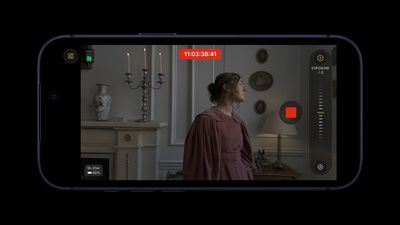
Final Cut Camera 2.0 supports ProRes RAW video recording and genlock on the iPhone 17 Pro and iPhone 17 Pro Max, and it offers new manual adjustments for the Center Stage front camera across the iPhone 17, iPhone 17 Pro, and iPhone Air models.
Here are Apple’s release notes for Final Cut Camera 2.0:
Final Cut Camera 2.0 includes the following features and enhancements:
• Capture ProRes RAW in open gate for full-frame resolution and incredible editing performance.*
• Record in high dynamic range and an even wider color gamut with Apple Log 2 in ProRes or HEVC.*
• Easily enable timecode options including Time of Day, Record Run, or external timecode for precise identification of your footage. (Requires iOS 26.)
• Genlock multiple video sources with precise frame alignment using a compatible sync generator.*
• Quickly switch to the 200mm (8x) telephoto lens to capture the perfect shot.*
• Dynamically adjust the video orientation to vertical or horizontal with the front-facing camera, regardless of how you hold your iPhone.*
*Requires supported iPhone models.
Read our coverage of the Final Cut Camera 2.0 announcement for more details.
Popular Stories
Apple Says Installing iOS 26 Might Impact Battery Life
In the iOS 26 release notes, Apple is warning iPhone users that installing the new software might have a temporary impact on battery life, which is normal. A new support document explains that major iOS updates require background setup like indexing data and files for search, downloading new assets, and updating apps. Further, Apple says that new features could require more resources,…
AirPods Pro 2 and AirPods 4 Get iOS 26 Features With New Firmware Update
Apple today released updated firmware for the AirPods Pro 2 and the AirPods 4, introducing support for the new AirPods features that are included in iOS 26, iPadOS 26, and macOS Tahoe. The firmware has a build number of 8A356, and it replaces the current 7E93 firmware. With Apple’s new software updates, the AirPods Pro 2 and the AirPods 4 support better audio quality for phone calls and…
iOS 26.1 to iOS 26.4: Here Are 5 New Features to Expect on Your iPhone
iOS 26 was finally released on Monday, but the software train never stops, and the first developer beta of iOS 26.1 will likely be released soon. iOS 18.1 was an anomaly, as the first developer beta of that version was released in late July last year, to allow for early testing of Apple Intelligence features. The first betas of iOS 15.1, iOS 16.1, and iOS 17.1 were all released in the second …
iOS 26’s Liquid Glass Design Draws Criticism From Users
It’s been two days since iOS 26 was released, and Apple’s new Liquid Glass design is even more divisive than expected. Any major design change can create controversy as people get used to the new look, but the MacRumors forums, Reddit, Apple Support Communities, and social media sites seem to feature more criticism than praise as people discuss the update. Complaints There are a long…
Apple Reportedly Plans to Launch These 10 Products in ‘Coming Months’
Apple’s annual September event is now in the rearview mirror, with the iPhone 17, iPhone 17 Pro, iPhone 17 Pro Max, iPhone Air, Apple Watch Series 11, Apple Watch Ultra 3, Apple Watch SE 3, and AirPods Pro 3 set to launch this Friday, September 19. As always, there is more to come. In his Power On newsletter today, Bloomberg’s Mark Gurman said Apple plans to release many products in the…
iOS 26: The Top 100 New Features and Changes
Apple released iOS 26 on September 15, and it’s now available for all iPhone users with a compatible device. There are a lot of changes and features to learn about, so if you want a quick, easy-to-read list that outlines what’s new, we’ve got you covered. Design Liquid Glass design that reflects light and refracts what’s underneath. It’s system wide, with dynamic tab bars and toolbars…
iOS 26: All the New iPhone Lock Screen Customizations
Apple has now made iOS 26 available to download on compatible iPhone models, and if you just installed the new software, Apple has made some changes and feature additions to the iPhone Lock Screen that you may want to check out. To download iOS 26 on your iPhone, go to Settings ➝ General ➝ Software Update, then let your device check Apple’s servers for the latest software. Wait for the…