Now that Apple Vision Pro has launched in the U.S., Apple has released additional support documentation for the device, including how to connect and charge the Vision Pro battery.
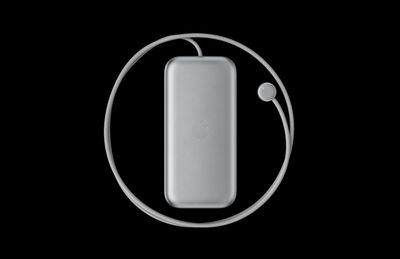
Notably, Apple’s document reveals that the external battery also powers Apple Vision Pro when you’re not wearing it, allowing the device to sync your mail, photos, and more. If the headset isn’t worn for 24 hours though, it turns off automatically.
To check if Apple Vision Pro is still powered on when you’re not wearing it, pick up the device. If it’s powered on, the light on the power cable will turn on briefly. If Apple Vision Pro has turned off, press and hold the top button for three seconds to turn it back on. After about a minute, Apple Vision Pro makes a tone that means it’s ready to use, and the light on the power cable will be solid.
Apple recommends disconnecting the battery if you know in advance that you won’t be using the headset for an extended length of time. To disconnect the battery from Apple Vision Pro, users are advised to first save any open documents — since disconnecting the battery turns off the device — then turn the power cable counterclockwise until it detaches.
Additionally, Apple outlines what the battery’s light tells users about its charge level when it is first connected to power, or moved or tapped while charging:
- Green for several seconds: the battery is charged to capacity.
- Amber for several seconds: the battery’s charge level is less than 100%, but has enough charge for you to use Apple Vision Pro.
- Amber pulsing slowly: the battery’s charge level is too low to power your Apple Vision Pro. Keep charging the battery for 10 minutes, or until the light shows amber steadily (not pulsing) when you tap the battery.
Apple also explains what the battery light’s color changes mean when users disconnect it from power, or moved or tapped when it’s not charging:
- Green for several seconds: the battery is charged to 50% or higher.
- Amber for several seconds: the battery’s charge level is between 1% and 49%.
- Amber pulsing slowly: the battery’s charge level is too low to power your Apple Vision Pro. Charge the battery for 10 minutes, or until the light shows amber steadily (not pulsing) when you tap the battery.
Apple also cautions users not to sit down with the battery in their back pocket, pull the battery off a desk when standing up, or let it fall between seats on an airplane.
According to Apple, Vision Pro batteries can be used for up to 2 hours of general use or 2.5 hours of 2D video watching when fully charged, or all day when connected to power. Apple sells additional Vision Pro battery packs for $200 a piece, but they are not hot-swappable.
Popular Stories
Apple Has Sold Approximately 200,000 Vision Pro Headsets
Apple has sold upwards of 200,000 Vision Pro headsets, MacRumors has learned from a source with knowledge of Apple’s sales numbers. Apple began accepting pre-orders for the Vision Pro on January 19, so the headset has been available for purchase in the U.S. for 10 days. Last Monday, Apple analyst Ming-Chi Kuo claimed that Apple had sold an estimated 160,000 to 180,000 Vision Pro units during …
iOS 18 Potentially ‘Biggest’ Software Update in iPhone’s History
Apple has big plans for iOS 18, according to Bloomberg’s Mark Gurman. In the subscriber-only Q&A section of his Power On newsletter today, Gurman said iOS 18 has the potential to be the “biggest” software update in the iPhone’s history. “I’m told that the new operating system is seen within the company as one of the biggest iOS updates — if not the biggest — in the company’s history,” …
Kuo: iPhone 16 Models to Lack Significant Design Changes Beyond Larger Displays and Capture Button
iPhone 16 models launching later this year will not have any “significant design changes,” according to Apple supply chain analyst Ming-Chi Kuo. Kuo also said that Apple is unlikely to offer “more comprehensive” generative AI features until the iPhone 17 series launches next year at the earliest. “It is expected that Apple will not launch new iPhone models with significant design changes…
Apple’s iCloud Services Experiencing Outage
Some of Apple’s iCloud services are down at the current time, with the iCloud.com website non-functional and iCloud Mail failing to load. There are multiple reports on Twitter and other social networks, and Apple’s System Status page says that some iCloud Mail users may not be able to send, receive, or access their messages. Apple’s System Status page also lists an issue with iCloud web…
Apple Releases New Firmware for AirPods Max
Apple today introduced a new firmware update for AirPods Max. The new firmware is 6A324, up from the 6A300 firmware released in September. Apple does not provide details on what features might be included in the refreshed firmware, so it is unclear what’s new. The limited release notes for the update list only “bug fixes and other improvements.” Apple also does not offer instructions on…
Apple Announces More Than 600 Apps Already Optimized for Vision Pro
Apple today announced that over 600 apps with native support for visionOS will be available on the Vision Pro when the headset launches in the U.S. this Friday. Max (formerly HBO Max) app on Apple Vision Pro For entertainment, streaming and sports apps like Disney+, IMAX, Max, MLB, NBA, PGA TOUR Vision, and Red Bull TV have all been optimized to take full advantage of the Vision Pro’s spatial …