Google is expanding its cross-platform file sharing feature to additional Android devices, allowing them to transfer files to an iPhone using the AirDrop protocol. AirDrop support for Quick Share is coming to the Pixel 9, Pixel 9 Pro, Pixel 9 Pro XL, and Pixel 9 Pro Fold over the next few days.
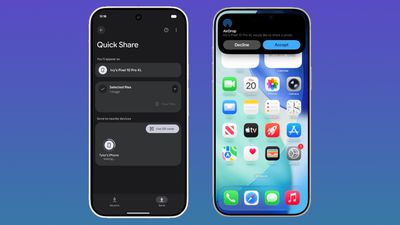
Google announced Quick Share compatibility with AirDrop back in November, but the feature was initially limited to the newest Pixel 10 devices.
With AirDrop interoperability, Pixel 9 and Pixel 10 devices can transfer files to an iPhone, iPad, or Mac, and it works the same way as Apple device to Apple device AirDrop transfers. No internet connection is required.
To accept files from a Pixel smartphone, Apple device users need to change their AirDrop visibility to “Everyone for 10 Minutes.” With the setting enabled, a file coming from an Android user looks identical to an AirDrop file from an iPhone, with the same notification and option to accept. Files are saved in the appropriate location, with a photo going to the Photos app or a document going to the Files app.
To receive files from an Apple user, the Pixel user will also need to turn on the Everyone for 10 minutes setting or enter into Receive mode on the Quick Share page. Files are saved in the Files app.
According to Google, Quick Share and AirDrop interoperability was designed with a multi-layered security approach to ensure a safe sharing experience regardless of platform. There’s a secure sharing channel, built-in platform protections for Android and iOS, and a consent requirement before a file is received.
Connections between devices are direct and peer-to-peer, so data is not routed through a server. For file transfers in both directions, the Apple device or the Pixel device displays the other person’s device name for verification purposes.